
|  | | Access Master-Detail Image Form A common question in Access is how to overcome the limitations of "Continuous Forms" when using images. The Paging sample presents a solution for displaying multiple images on a form; this sample builds on the Paging technique by incorporating it into a one-to-many relationship, allowing a variable (and unlimited) number of images or photos for each master record.
A subform displays the images for the current record using a fixed grid of DBPix image controls, with Prev/Next buttons to navigate through additional "Pages" of images. To add or edit images the subform is dynamically switched to a standard form in "Single Form" view.
This sample stores the images in the database (i.e. "embedded"). A version with images stored as external files (i.e. "linked") is available here.
| Screenshots
|
| System Requirements
Any Win32 platform (e.g. Windows 95, 98, ME, NT, 2000, XP, Vista, Server 2003 or Server 2008).
Access 2000 or later (Access 2000, XP/2002, 2003 or 2007).
DBPix 2.0
Installation
Unzip the download then open the mdb file in Access.
Walkthrough
Open the form 'frmMain', and maximize it.
Click the Main photo to see a detailed version.
Close the Detail window.
Click the 'Next' & 'Prev' buttons to browse through the available sub-images for the current master record.
Click one of the sub-image thumbnails to see a detailed view, then close the Detail window
Right-click on the main image to see image tools (eg to load or paste a new image).
Click the 'Edit' button to switch to the sub-image editing form, then right-click on an image to load a new image.
Click the 'View' button to switch back to the viewing form.
Technical Overview
This sample takes the 'Paging' approach and combines it with a one-to-many relationship and subforms to produce an application with a 'Main Photo' and 'Additional Photos' structure. The multi-view form of the Paging sample is used in a subform to display the 'Additional Photos' for an item, supporting a variable and unlimited number of additional photos for each item. To edit the additional photos the 'Multi View' subform is switched for a different one, which is based on regular bound controls in a single form view.
|
Files & Code
| | File / module | | Description | | |
| | frmMain | | Main Form | | View Code | | fsubViewSubImage | | Subform for viewing sub-images | | View Code | | fsubEditSubImage | | Subform for editing sub-images | | View Code |
|
|
Revision History
| | Date | | Filename | | Description |
| | 20 Aug 2007 | | multiview-v2.zip | | Simplified image grid update code. | | 5 Mar 2006 | | multiview.zip | | Initial Version |
|
| | 000000000000000000000000000000000000000000000000000000000000000000000 |  |
|
|
|

 Home
Home Tutorials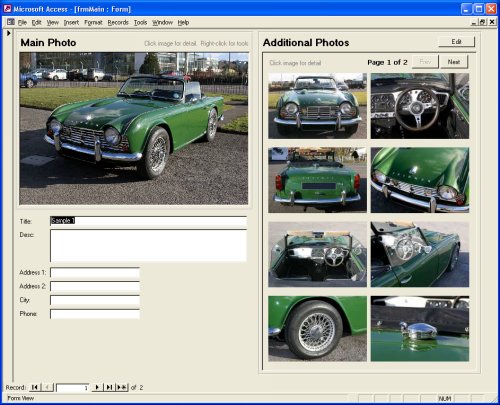
)
)
)